VPN Service — Technical Dossier
The shorter read — the whole service without the depth below — is the VPN service page. What follows is the full dossier, nothing trimmed: who runs the tunnel, how the tiers work, what is and is not logged, and how to verify each claim yourself.
Why use a VPN at all?
Every time you open a website, two small facts travel ahead of the page: the name you asked for, and where you are asking from. On a home connection, both pass through your internet provider, which is allowed to keep a record of them. On hotel, café or airport Wi-Fi, they also pass through a network you know nothing about.
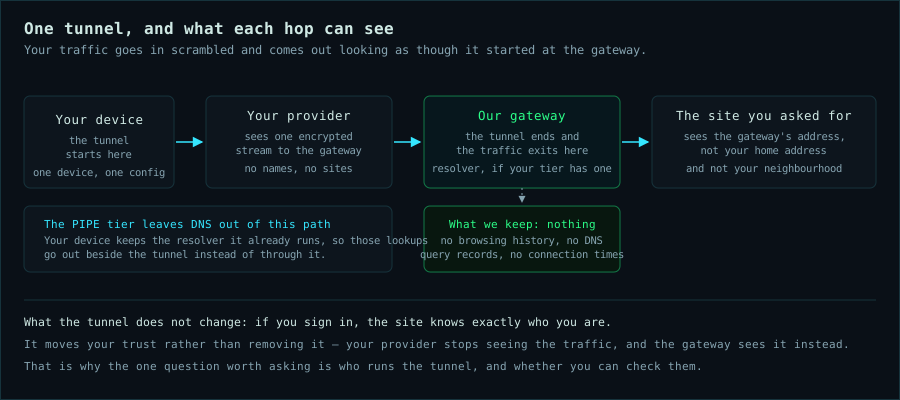
A VPN — short for virtual private network — is a private tunnel between your device and a server you have chosen to trust. What you send goes into the tunnel, scrambled so that only the two ends can read it, and it comes out the far end looking as though it started there rather than at your house. “Scrambled” is the same idea as the padlock in your browser’s address bar, applied to the whole connection instead of a single website.
That is worth having for three ordinary reasons:
- Your internet provider stops keeping a list. It can already see every site and service you connect to without ever reading your email. Inside a tunnel, there is no list to keep.
- Public Wi-Fi stops being a special case. On a network you do not own, the names you look up and the sites you visit are no longer readable by whoever runs it.
- You are harder to pick out of a crowd. Sites see the tunnel instead of your home address, your neighbourhood and your provider.
What a VPN does not do
The adverts are vague about this part, so it is worth being plain:
- It is not anonymity. If you sign in to your email, your bank or Facebook, you are still you — the site knows exactly who you are, and the tunnel changes nothing about that.
- It does not replace anything else. Keep the password manager, keep the updates, keep the padlock.
- It moves your trust rather than removing it. Your internet provider stops seeing your traffic — but the VPN now sees it instead. So everything rests on one question: who runs the tunnel, and can you check them?
Who runs the tunnel
That question is where most VPN services would rather you did not look too closely. Several of the brands you have heard of turn out to share one owner, and the money behind that owner came from advertising and data brokerage rather than from subscriptions — an odd foundation for a promise of “no logs”. Opacity is closer to the rule than the exception: a brand marketed in one country, run by a subsidiary in a second, owned by a holding company in a third, behind a chain of shell companies, with code you are invited to trust but not to read. Much of that ownership ends in a country whose intelligence services are close partners of the United States — and a VPN is the ideal honeypot for anyone who wants to watch: one machine that every request you make passes through, run by owners you cannot trace. In one well-documented case, a popular “free” VPN paid its own bills by renting out its customers’ internet connections to third parties — while they slept.
None of that is illegal, and not every provider behind an opaque owner is hostile. The problem is narrower than malice, and harder to live with: from the outside you cannot tell the difference, and you should not have to guess. A tunnel you cannot inspect is a promise, not a fact.
Here is what you can check about this one:
- A named operator, in named countries. YMRTECH LLC is a Wyoming company, run by one person, and the gateways your traffic leaves from sit in datacentres in Canada and in Mexico — with more being added over time. Three named countries, each answerable to a court, and no chain of owners between you and the person who answers the email.
- The service is code you can read. The infrastructure is declarative Nix under version control at git.ymrtech.com — nothing is hand-edited on a running machine, so what is published is what runs.
- The tunnel is a public standard, not an app of mine. WireGuard is open, small, and built into Windows, macOS, Linux, iOS and Android. You install nothing from me: no bundled browser, no analytics, no background helper phoning home.
- The claims are tests, not adjectives. The infrastructure audit tests the no-log behaviour instead of asserting it, and what we log names the exceptions instead of hiding them. All of it is checkable before you pay.
In practice, it amounts to one small, specific thing.
What you get
A WireGuard tunnel from your devices to a gateway I run, plus a DNS resolver that answers inside it. That is the whole product: no client app, no bundled browser, no telemetry SDK. You get a WireGuard configuration (or a QR code) and your operating system’s own WireGuard client does the rest — see the client setup guide.
Each device gets its own tunnel, and the tunnels are yours to arrange: by default every device is a separate lane to the internet, and you can put your own devices on speaking terms with each other when you want them to. That part is described in your own devices, one private network.
The three tiers exist because of one question: who resolves your DNS, and is anything filtered? Every tier hides your source IP from the sites you visit. Only two of them also keep your name lookups away from your ISP.
The three tiers
DNS: untouched. The configuration carries no DNS setting, so your device keeps the resolver it already runs.
Hides: your source IP from every site you visit. Leaves alone: your lookups — they go to your own resolver, outside the tunnel.
For you if: you already run encrypted DNS you trust, or you have split-DNS and corporate names to resolve.
DNS: ours, inside the tunnel. Your device resolves through a resolver we run, reachable only from inside the tunnel, which forwards upstream over DNS-over-TLS.
Gains: your ISP stops seeing which names you look up — it sees one encrypted stream to the gateway. No filtering: whatever you ask for resolves.
The default choice: everyday privacy, with nothing standing between you and what you asked for.
DNS: ours, with filter lists. Our filtered resolver blocks ads, trackers and known-malware domains before your device reaches them.
Gains: everything the privacy tier does, plus blocking that works on every device — no browser extension needed. Isolation: its own resolver instance, so filter lists and caches never touch the other tiers.
For phones, tablets and family devices. Something useful got blocked? The portal's filter-list page shows what, and takes an exception request.
The tiers differ in DNS only — never in speed. All three run through the same gateway with the same shaping: up to 1 Gbit/s per connection, on a line that is shared with other customers. No tier is faster, slower, or upsold by bandwidth.
How a tier gets assigned
The tier is chosen per device when you add it in the portal, and different
devices on the same subscription can run different tiers — a laptop on privacy,
a phone on security, a work machine on pipe. To move a device between tiers,
remove it and add it again under the new tier: each device gets its own tunnel
configuration, so switching means downloading a new config file or QR code rather
than editing the existing one.
Your own devices, one private network
An account covers three devices, and a tunnel can do more than point them all at the internet. In the portal’s device-to-device page you decide which of your own devices may reach which — one direction at a time, and either all traffic or a named protocol and port list. Reach a home server from a laptop without exposing it to anything else, let a phone pick a file up from a desktop, or open exactly one port between two machines.
The defaults are the point:
- Closed until you say otherwise. A device you add reaches the internet and nothing else of yours. Reachability is a decision you make, not something you inherit by adding a second device.
- Your own devices only, at both ends. A link can only ever join two devices on the same account, and only from the account that owns them. Other customers on the same gateway are not part of your network and cannot be made part of it.
- One-way, and pinned to the device rather than its address. Allowing A→B does not allow B→A; replies to a connection you allowed come back on their own. A link names the device, so revoking a device ends its access, and the tunnel address it was using can be handed to another device without carrying the permission with it.
- Narrow by choice, broad on request. All traffic is available, but the common answer is a single port between two machines, and that is the one the page makes easy.
Applying a change rewrites the firewall on the gateway and takes about half a minute; your devices stay connected while it lands. It is the same declarative configuration as the rest of the service, so what the portal shows you and what the gateway enforces are the same thing.
The price
$10/mo or $80/yr (USD), billed by card through Stripe — pay monthly, or pay for the year up front. One subscription covers all three tiers: they are DNS postures on the same connection, so there is no “better” plan to upsell you into and nothing to meter — no data cap, no per-gigabyte billing, no usage-based fees. Choose the plan when you create the account. Cancel any time; access runs to the end of the paid period, and partial periods are not pro-rated. The details live in terms & fair use.
Being straight about what this is not: it is a privacy service, not a geo-unblocking one. There is a small, fixed set of gateways, no rotating exit addresses, and no residential proxy pools. It will not pretend to be a Netflix-region machine, and it will not sell you a number on a speed test.
What we do not keep
- No browsing history. No DNS query records. No connection times. Not on any tier — the resolvers run with query logging and statistics disabled, so the tiers’ names are not “more logged” than each other.
- What we do hold, and why: your email and password hash, your Stripe subscription record, your device records (name, tier, assigned tunnel IP, public key) and aggregate byte counters per account for fairness. Byte totals carry no destinations.
- The full list, with retention, is on the what we log page — it names the exceptions instead of hiding them.
Verify it, don’t trust it
- Read the audit. The infrastructure audit reviews the gateway configuration, both tier resolvers, and tests the no-log assertions rather than asserting them in prose: infrastructure audit. The signed report is also published at vpn.ymrtech.com/logging-audit.
- Read the source. The infrastructure is declarative Nix; nothing is hand-configured on a running machine. git.ymrtech.com
- Read what we hold. What we log — the exact list, with retention windows.
- Test it yourself. The portal shows whether the current browser is on the VPN at all, and the DNS leak test sends a uniquely-named probe lookup and confirms whether it reached our resolver through the tunnel — plus a link to an external test that lists the full resolver chain. Open the portal.
- Watch it live. Service status publishes the checks we watch — the portal, both tier tunnels, both tier resolvers, the website, the forge and mail — so a blip can be told from an outage before anyone opens a support thread.
Questions
Which devices can I use it on?
Three devices per account, each with its own tier. Any client that speaks WireGuard: the official apps for Windows, macOS, Linux, iOS and Android, open-source clients such as wg-quick and WG Tunnel (Play Store) on Android, or a router that supports WireGuard imports. The setup guide covers each platform.
Can my devices reach each other through the tunnel?
Only if you say so. As a device is added, it reaches the internet and nothing else of yours. The portal’s device-to-device page is where you link your own devices — one direction at a time, either all traffic or a named protocol and port list. Two devices on the same account can be joined; a device belonging to another customer cannot, and yours cannot be joined to theirs. The mechanics are in your own devices, one private network.
Can I bring my own DNS?
Yes — that is the pipe tier. Your device keeps whatever resolver it already
has, including in-browser DNS-over-HTTPS.
How do I know my DNS is going through the tunnel?
The portal answers this two ways. It reports whether the browser you are using is on the VPN at all, and the DNS leak test mints a unique probe name, has your browser look it up, and then checks whether that lookup reached YMR’s resolver inside the tunnel. If a device’s client is falling back to its own resolver or to in-browser DNS-over-HTTPS, the query never arrives and the test says so. It deliberately does not try to enumerate the whole resolver chain, so the page also links an external test that lists every resolver the outside world can see.
How do I know the service is up?
Service status is a live public page, checked once a minute: the portal, both tiers’ tunnels and both tiers’ resolvers, plus the website, the forge and mail. If something a device depends on is down, it shows there. If a check you rely on is missing from that page, say so through contact.
What happens if I cancel?
Access stops at the end of the paid period, and the device records are gone with the account. Cancellation and refunds are covered in terms & fair use.